How to add lower thirds to a video podcast (guest names, topics, episode)
10 min · 6 steps
 Lower third makerTry it now — free →
A video podcast is mostly people talking, which makes it hard for someone who lands in the middle to know who is who. Clips cut from the episode for Shorts and TikTok have the same problem, only worse: the viewer never saw the introduction. A lower third, the name title at the bottom of the frame, fixes that in three seconds.
This guide covers the part most tutorials skip: who gets a lower third, when it appears and how often to bring it back, plus how to make podcast lower thirds with a transparent background and drop them into any editor.
The short answer
Make one lower third per person, with their name and one short line about them, and export it with a transparent background. Show it the first time each person speaks, for three to five seconds, and again after every long stretch and at the start of every clip you cut for social media. For a show that runs by topics, add a topic tag that changes with each segment.
Try it now: Lower third maker (free)
Type a name and a title and watch six lower thirds play with them, before opening any of them.
What you need
- The edited episode (or the clips you cut from it) and the names and roles of everyone who speaks.
- Optional: a photo or logo of each guest, and their @handle.
- Any editor that imports video, and an AnimateMyVideo account to download the files (you sign in with Google).
The templates in this guide
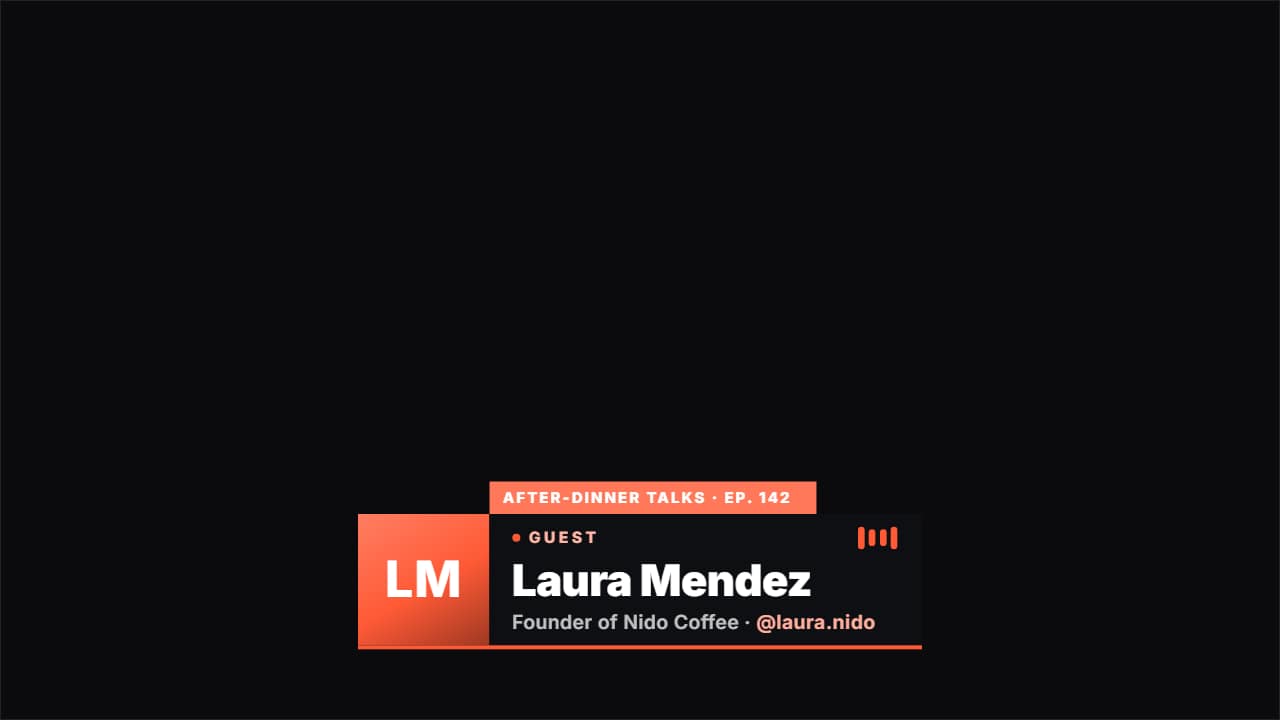
- Podcast guest lower thirdIntroduces whoever is on the show: their photo, their name, what they do and their @, with a «GUEST» badge…
 Lower third · PillA translucent rounded pill with the initial in a colored circle. Modern, works well on social.
 Glass name lower thirdThe «who's talking» strap in glass: name, role and your handle.
Step by step
Step 1: Decide who gets a lower third
Everyone who speaks on camera gets one: the host, each guest and any co-host. Write the name the way the person wants it written and one line that explains why they're worth listening to: «Founder of Nido Coffee» says more than «Entrepreneur». If they have a channel or an Instagram, keep their @handle at hand.
Step 2: Try the styles with the real names
In the free lower third maker, type a name, a role and, if you want, the @handle, and watch six styles play with them at once: four classic lower thirds, a glass card and the podcast guest tag. It's the fastest way to see which one fits your show before you open the editor.
Step 3: Make the guest tag
The podcast guest lower third was made for this: a «GUEST» badge, the name, what they do, their @, a photo in a circle, a tab with the show name and the episode number, and voice bars that move as if they were speaking. It has three styles, a TV bar, glass and editorial. Change the badge to «CO-HOST» or «EXPERT» when it fits; anything you leave empty simply doesn't show.
Step 4: Place it on the right side of the frame
In a two-camera shot, put each person's lower third on their own side: the guest tag can sit left, center or right, and the classic styles left or right and higher or lower. In vertical clips, keep it above the bottom fifth of the frame, where Shorts, TikTok and Reels put their captions and buttons.
Step 5: Export one file per person
In «Format & background», choose «No background» for a transparent ProRes 4444 .mov, and the format of your episode: 16:9, or 9:16 for the clips. Export, sign in with Google to download (during the open beta, new accounts get export credits at no cost), then change the name and export again for the next person.
Step 6: Time it in your edit
Put the file on a track above the footage. Then:
- First time they speak: start the lower third half a second after they start talking, so the eye goes to the face first.
- How long: three to five seconds. Long enough to read the name twice, short enough not to cover the conversation.
- Bring it back: after a long stretch (every 10 to 15 minutes in a long episode) and at the start of every clip you cut for social media.
A topic tag for long episodes
Lower thirds say who is talking; a topic tag says what about. The current topic tag takes your list of segments with the second each one starts, and changes on its own with a «NOW» badge, the topic number and a bar that fills until the next one. It helps viewers who jump around the timeline, and it makes clips easier to understand out of context.
Keep the style consistent
Pick one style and one accent color for the whole show and use them in every episode. Viewers learn the look, and the lower thirds stop feeling like decoration and start feeling like part of the show. Save the version you like in «My projects» so next week you only change the names.
Questions
- Should the host have a lower third too?
- Yes, at least once per episode and in every clip. New viewers don't know the host either, and a clip on Shorts or TikTok may be the first time they see the show.
- How long should a podcast lower third stay on screen?
- Three to five seconds is enough to read a name and one line. Longer, and it starts covering the conversation.
- Can I put the guest's photo in it?
- Yes. The podcast guest lower third has a photo slot; upload a picture or a logo and it goes in the circle. The glass card also takes a photo or logo.
- Will the transparent file work in my editor?
- The ProRes 4444 .mov keeps its transparency in Premiere Pro, DaVinci Resolve, Final Cut Pro and CapCut on desktop. In CapCut on a phone, export it «On my video» with your clip as an MP4 instead.
Try it now: Lower third maker (free)
Type a name and a title and watch six lower thirds play with them, before opening any of them.